Installation Guideline
Requirements:
- Have a user account for DLR dataspace.
- Git and Docker are avaialble on your machine.
Pull the KIT framework Github repository:
git clone https://github.com/rox-architecture/kit-framework-deployment.git
cd kit-framework-deployment
Below video shows the installation process. Alternatively, written instructions are provided in the following sections.
Installation Video
Written Instructions
Set environment variables (.env)
In the folder, rename the .env.example file to .env file.
cp .env.example .env
In the .env file, set the below environment variables.
- BASE_URL_DLR_CONNECTOR
- API_KEY_DLR_CONNECTOR
- DOCKER_SOCKET_HOST
- ARTIFACT_HOST_ROOT
BASE_URL_DLR_CONNECTOR and API_KEY_DLR_CONNECTOR variables are needed for connecting to the DLR dataspace connector.
To know these values, first login to DLR dataspace web UI.
Then, find the connector name and the API Key button as indicated in the image below.
If you haven't yet created a connector, then create an HttpData type connector.
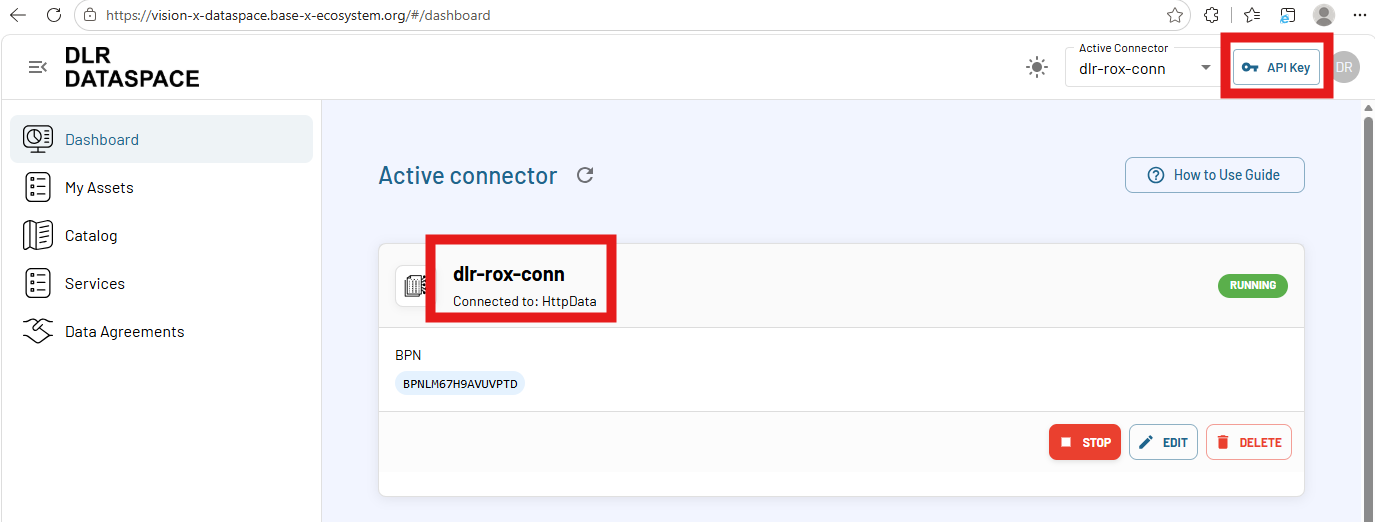
BASE_URL_DLR_CONNECTOR value in the example above is:
- https://vision-x-api.base-x-ecosystem.org/connectors/dlr-rox-conn
API_KEY_DLR_CONNECTOR value should look like:
- sk-...
DOCKER_SOCKET_HOST is the host machine Docker socket required for handling container type dataspace assets. To know your socket path
echo $DOCKER_HOST
Given the output is something like unix:///var/run/docker.sock, then DOCKER_SOCKET_HOST value is:
- /var/run/docker.sock
ARTIFACT_HOST_ROOT is the directory where you want to store all the dataspace assets from KITs.
By default, the value is:
- /home/dataspace/artifacts
Run the KIT framework
Run With GUI
docker compose --profile gui pull
docker compose --profile gui up -d
Later, if you want to stop:
docker compose --profile gui down
Run without GUI (headless)
docker compose pull
docker compose up -d
Later, if you want to stop:
docker compose down
Check everything is running correctly
- Access GUI: http://localhost:8088/
- Access backend API: http://localhost:8080/
- Access federated catalog: http://localhost:8000/catalogs